


Franklin Lite
Franklin Lite is simple inventory management application that can be fully customised to suit your business needs; brought to you by Breakwater IT’s AI and Automation team.
The system is designed to reduce chaos in your warehouse, office, or stock room. Monitor your stock levels live, have full batch traceability, and gain valuable insights with key statistics.
Customised for you

Warehouses

Hospitality

Offices

Contractors
Key Features
Learn more about some of the key features on Franklin Lite.
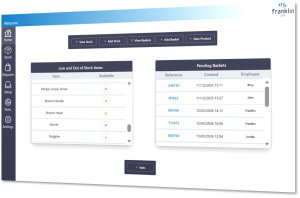
Your homepage shows low and out of stock items, and pending baskets; giving you clear indicators on what inventory you need to restock and it’s movement.
Across the top you’ll find shortcuts to key tasks, such as adding stock, crating baskets, viewing stock and more.
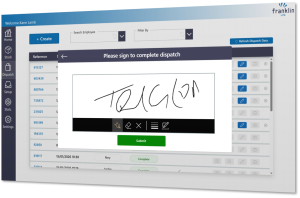
Franklin Lite has the ability to generate unique batch lots, allowing you to trace your inventory from the point of receiving goods to dispatching.
You’ll benefit from end-to-end traceability of your inventory, as well as visibility of who is using what, and when.
The app also requests signatures to dispatch stock.
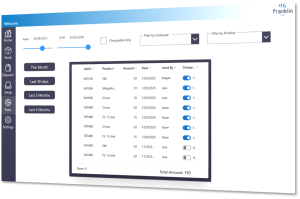
Gain valuable insights with usage reports and statistics.
Filter by date range, which employee, what products, and more, allowing you to analyse and forecast accurately.
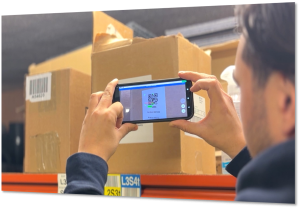
Franklin Lite includes the ability to print QR codes and barcodes to help with stock tracking.
It also has a built-in scanner for use on a tablet or mobile, or it can connect to your third-party scanner.
Can Franklin Lite be used with other systems?
Depending on available APIs and your requirements, Franklin Lite can be integrated and work with other systems and platforms.
Are there any requirements to use Franklin Lite?
Specific Microsoft licencing is required to use the application. Requirements will depend on your existing licencing and setup. Our team can help guide you through the requirements.
Do I need to be using Microsoft 365?
No, you do not need an existing Microsoft 365 setup or licencing to use Franklin Lite. We can help you get up and running.

Pricing
There will be an initial upfront cost for Franklin Lite, which includes any licencing requirements, implementation, and customisation.
The upfront cost will vary depending on your requirements and added features. Onsite implementation available.
There will then be an ongoing monthly fee, which includes app maintenance.